Originally published on Medium in Indonesian. Translated to English.
Background
Errors in production have to be handled fast. To do that, you need a bot that notifies developers the moment something breaks. This bot automates sending messages to a specific group in the team.
I currently work at a company that uses Lark as its messaging app, so I’ll build the bot on Lark.
Implementation
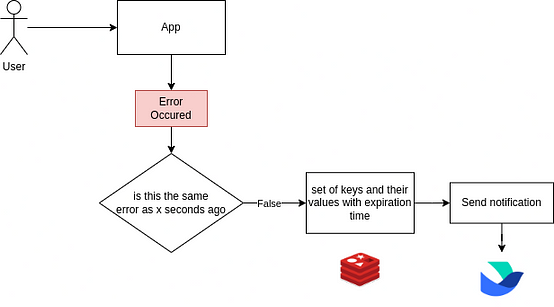
When an error appears while a user is interacting with the app, we first check whether it is the same error that happened x seconds ago. If it isn’t, we set a key (with an expiry time) and send a notification to Lark. If it is the same error, the bot stays quiet.
Giving the Redis key an expiry time is how we implement rate limiting. The goal is to stop the bot from sending the same message over and over.
1. Create a custom bot in a Lark group
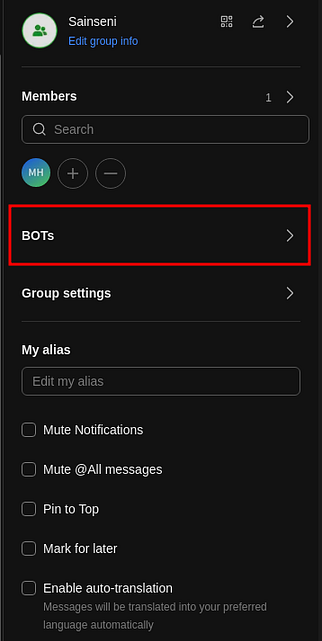
Open the settings of the group you want to add the bot to, then choose BOTs. You can add more than one bot to the same group.
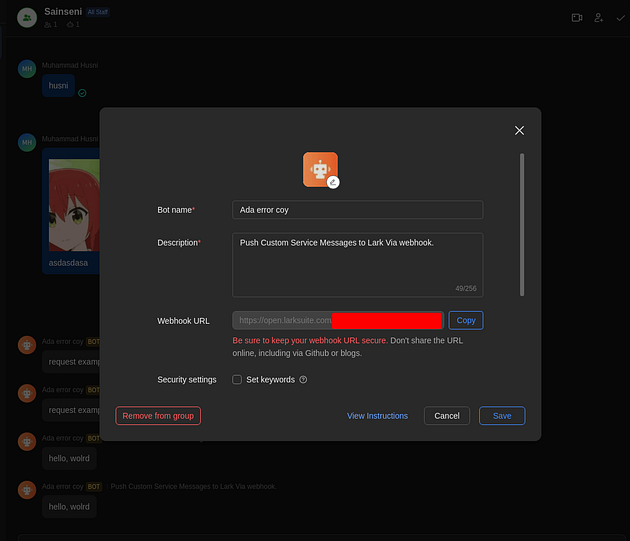
Fill in the form and copy the Webhook URL you are given. The webhook lets us integrate our own application with Lark, so we can automate things that happen in Lark.
2. Alert notifications in a Go project
I’ll reuse the project from my previous article, which already has a logger installed. The extra dependency is go-lark.
In this article the notification fires when the error status is 4xx or 5xx. First, let’s build the message template. CardMessageTemplate renders the message into a format Lark can read.
func CardMessageTemplate(cardMsgData CardMsgData) *card.Block {
	b := lark.NewCardBuilder()

	var errText string = fmt.Sprintf("message: %s", cardMsgData.errMsg)
	var reqText string = fmt.Sprintf("payload: %s", cardMsgData.reqData)
	var respText string = fmt.Sprintf("response data: %+v", cardMsgData.respData)

	cardCst := b.Card(
		b.Div().
			Text(b.Text(errText)),
		b.Div().
			Text(b.Text(reqText)),
		b.Div().
			Text(b.Text(respText)),
		b.Action(
			b.Button(b.Text("Inspect")).Primary().URL(cardMsgData.hyperLinkBtn),
		),
	).
		Red().
		Title("Yahallo Project Error")

	return cardCst
}
You can customize the message template however you like. go-lark ships a few examples in its repository: go-lark/examples.
Next, a function that sends the notification:
func SendNotifLark(errMsg string, code int, reqData string, respData ResponseData) {
	url := Config("LARK_WEBHOOK_URL")
	bot := lark.NewNotificationBot(url)

	cardData := CardMsgData{
		errMsg:       errMsg,
		hyperLinkBtn: Config("SEQ_URL"),
		reqData:      reqData,
		respData:     respData,
	}

	cardCst := CardMessageTemplate(cardData)
	msg := lark.NewMsgBuffer(lark.MsgInteractive)
	msg.Card(cardCst.String())

	bot.PostNotificationV2(msg.Build())
}
3. Avoid spam messages
As explained at the start, I’ll implement rate limiting to avoid spam. For that I’ll use Redis as a cache.
func SendNotifLark(rateLimit int, rateLimitKey string, errMsg string, code int, reqData string, respData ResponseData) {
	url := Config("LARK_WEBHOOK_URL")
	bot := lark.NewNotificationBot(url)

	cardData := CardMsgData{
		errMsg:       errMsg,
		hyperLinkBtn: Config("SEQ_URL"),
		reqData:      reqData,
		respData:     respData,
	}

	cardCst := CardMessageTemplate(cardData)

	msg := lark.NewMsgBuffer(lark.MsgInteractive)
	msg.Card(cardCst.String())

	if rateLimit > 0 {
		// Use a default rateLimitKey if not provided
		if rateLimitKey == "" {
			rateLimitKey = errMsg
		}

		cacheExist, err := RDB.SetNX(context.Background(), rateLimitKey, 1, time.Duration(rateLimit)*time.Second).Result()
		if err != nil {
			// Handle Redis errors here
		}

		if cacheExist {
			bot.PostNotificationV2(msg.Build())
		}
	} else {
		// If rateLimit is not greater than 0, post the notification immediately
		bot.PostNotificationV2(msg.Build())
	}
}
Here I made rate limiting optional. SetNX sets a key in Redis with the following options:
- NX (Not eXists): the key is only set if it does not already exist in the Redis database. If the key is already there, nothing happens.
- EX (Expire): gives the newly set key an expiry time. The value is the number of seconds the key lives before Redis deletes it automatically.
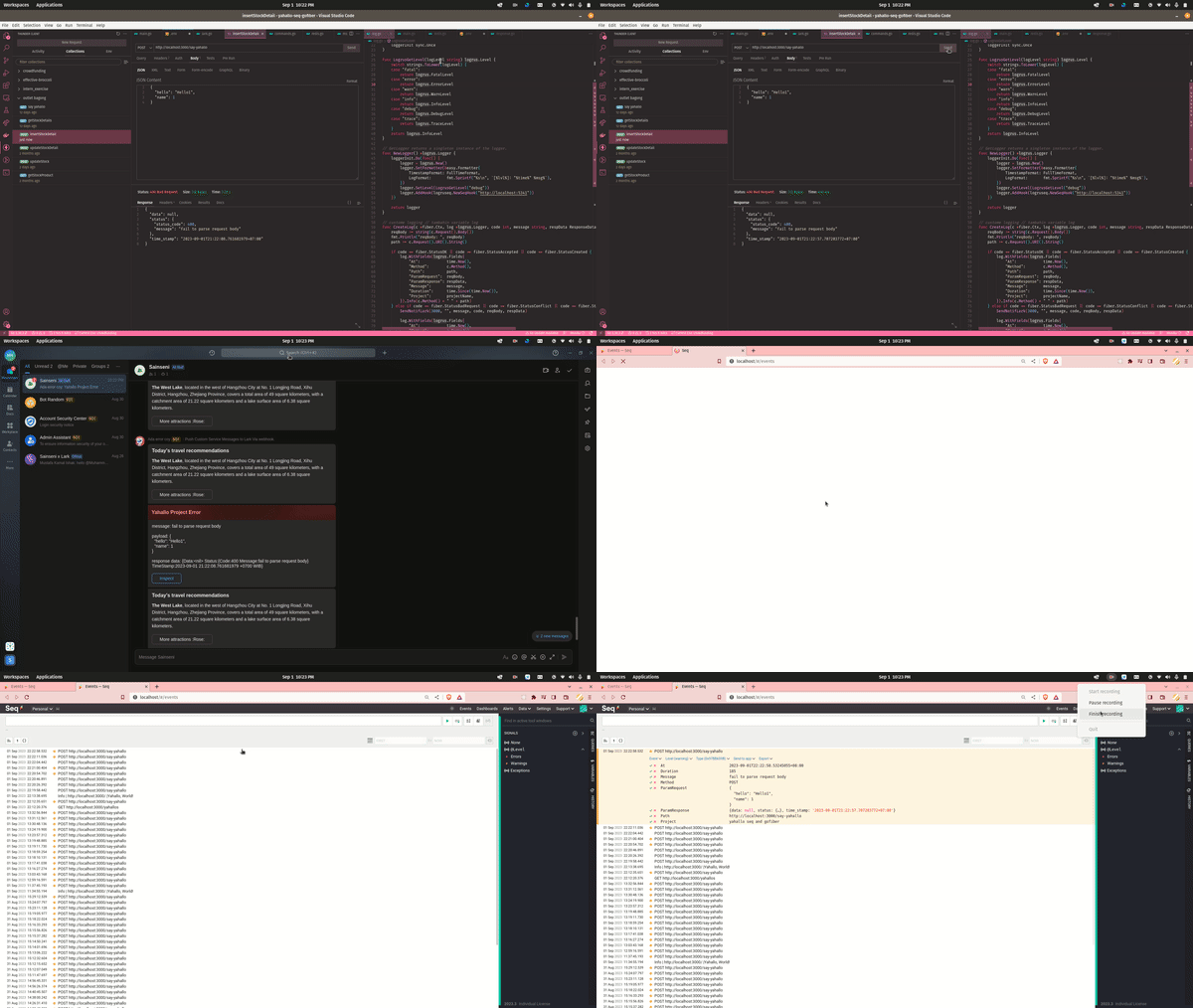
When it’s all done, the result looks like this:
Alert Notifications with Seq
If you don’t need any customization, you can use the Alert feature that Seq already provides.
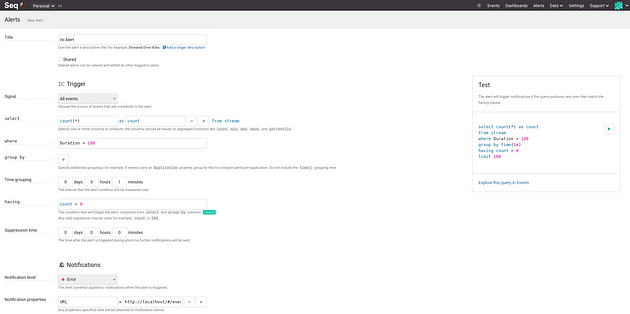
Feel free to explore it yourself. The thing to notice is that the plugin (the Output app instance) depends on the messaging app you use: for Slack use Seq.App.Slack, for Microsoft Teams use Seq.App.Teams, and so on.
I’m using Lark here, and Seq has no plugin for Lark. We can still use Seq.App.HttpRequest instead. After installing it, add an instance that uses the plugin.
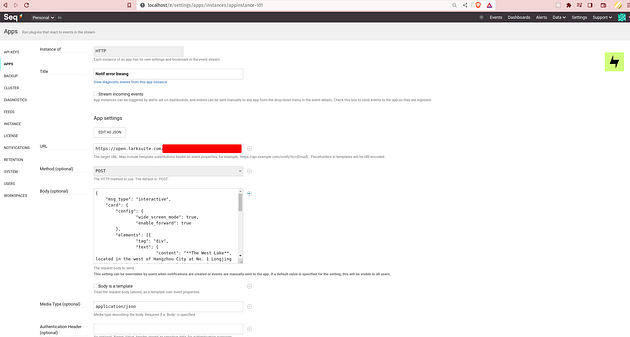
Fill in the URL with the webhook from the Lark custom bot you created earlier, and set the method to POST. Customize the message this alert sends in the Body field.
Closing
That’s it for “Building a Lark Bot to Notify You About Production Errors”. If you want to discuss or give feedback, leave a comment. I hope you enjoyed reading and found what you were looking for.
Written on 4 September 2023.